
The Claude operating math: 8 hours returned in 30 days
6 agents on HubSpot, Leexi, Gmail, and Slack. Built in a weekend. Here is the architecture that makes it run.

Save this. The prompt pack alone is worth 30 minutes of your time this week.
Send it to 1 Founder or GTM operator who is running Claude but has not yet wired an MCP or productized a Skill. This edition tells them exactly where to start.
The 90-second version
The problem: foundation files alone do not return hours. Productized Skills, MCPs, and agents do.
The system: Phases 2 and 3 of the AI with Claude operating system, Steps 5 to 12
The asset: [Full prompt pack and companion doc, free download]
The action: productize your first Skill today using Prompt 1 below
Read time: 6 min
Skip this if you read Monday and Wednesday
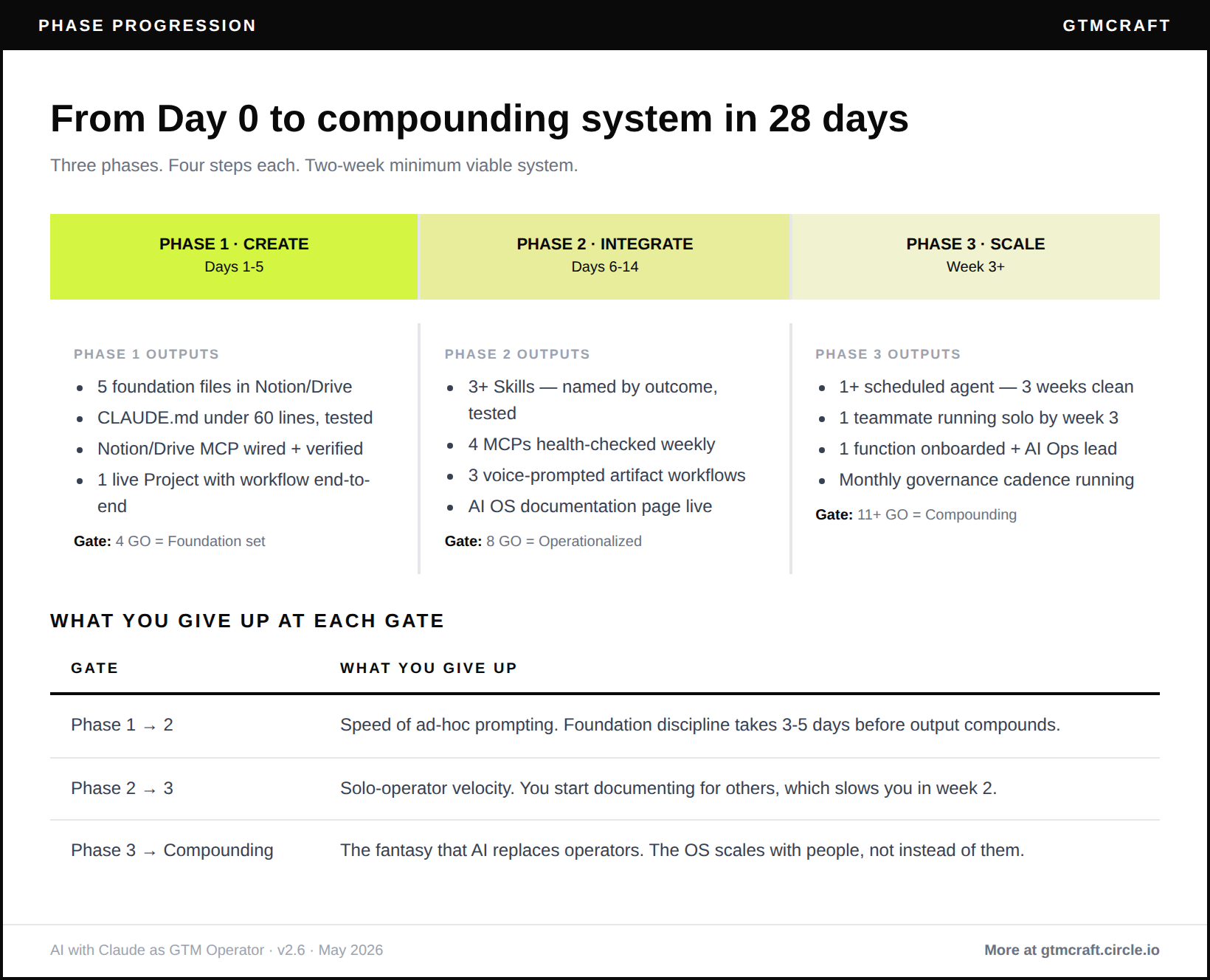
The AI with Claude operating system in 5 lines:
Most GTM teams prompt from scratch and cannot reproduce each other’s best output
Phase 1 CREATE built your five foundation files, CLAUDE.md, one MCP, and first Project
Phase 2 OPERATIONALISE converts recurring work into Skills and wired MCPs that produce artifacts
Phase 3 SCALE deploys scheduled agents, rolls to your team, and installs governance so quality holds
The companion doc with full self-assessment, cadence pack, and prompt library is linked below

Hi, it is Koen Stam and welcome to GTMcraft: The Future GTM Operator. This newsletter is built from 100,000+ GTM signals collected from 100+ operators and founders, combined with 13+ years of my own lessons and failures from the trenches. I write at the intersection of go-to-market practice and AI-powered systems for founders scaling 0 to 10M+ ARR.
100,000+ GTM relevant signals from LinkedIn, Newsletters and Podcasts indexed. 100+ playbooks structured. 3 GTM operator jobs across 3 GTM motions (SMB, MM, ENT). Same recipe. Now opening as a community.
Two numbers before we start
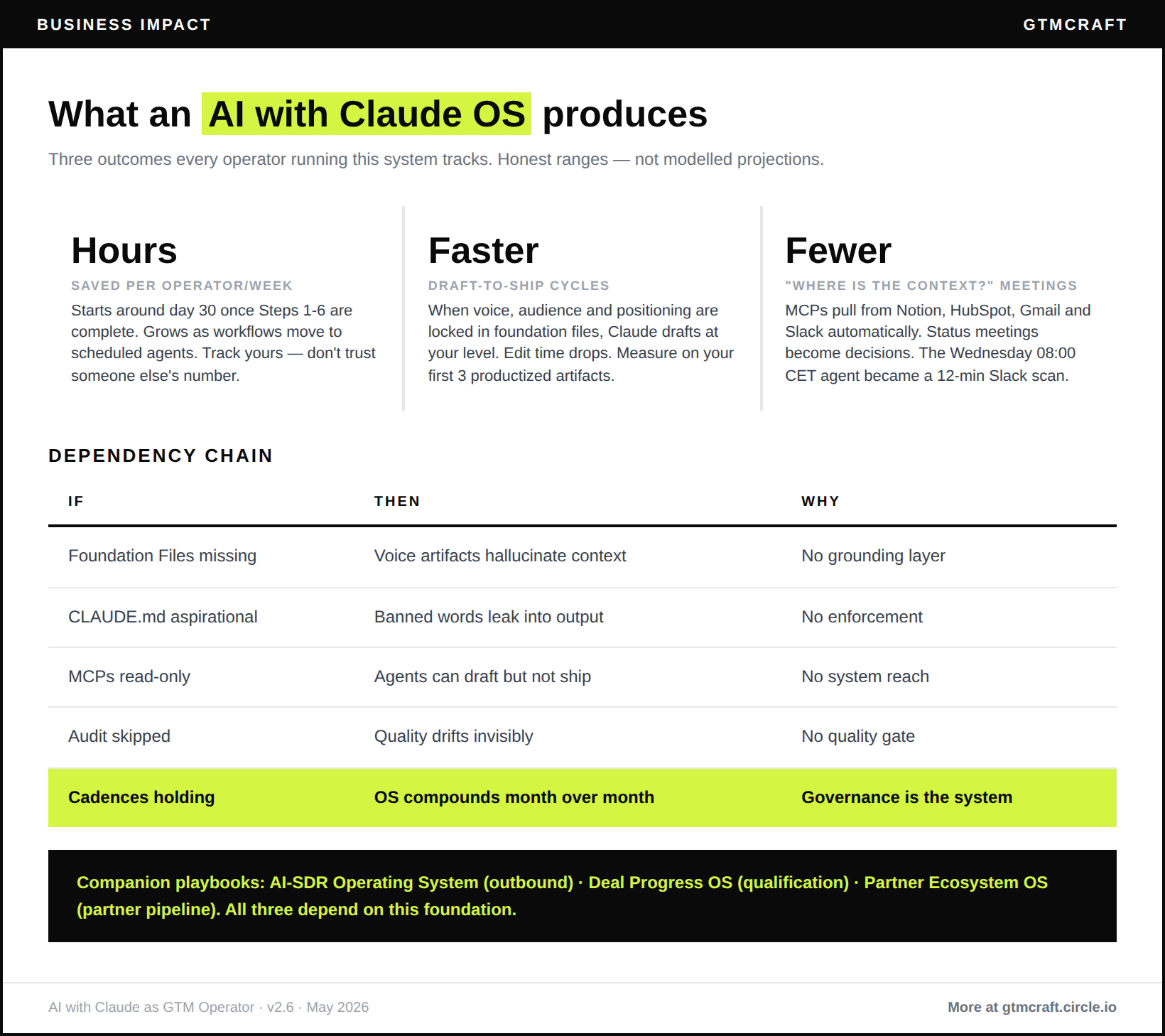
A sub-$5M employee advocacy operator I coach deployed a 6-agent Claude suite on HubSpot, Leexi, Gmail, and Slack over a single weekend. 6 to 8 hours per week returned on day one, climbing to 15+ by day 90 as workflows matured into background agents.
Kieran Flanagan’s operator research from late 2025 benchmarks it from the content side: operators who productize three or more Skills into named, reusable workflows see 2x to 4x content and analysis throughput versus operators running the same prompts from scratch. Draft-to-ship cycle drops from 30 to 45 minutes per piece to 10 to 15 minutes once voice, audience, and positioning are locked into foundation files.
Phase 1 is table stakes. Skills and agents are where the hours come back.
Phase 1 gate check
Before Phase 2, confirm:
All 5 foundation files exist and are saved in your primary Project
CLAUDE.md written, under 60 lines, tested against three real prompts
At least one MCP wired and verified
First Project has run one real workflow end-to-end
If no on any of these: Wednesday’s edition covers Phase 1. Phase 2 builds on sand without it.
Phase 2: OPERATIONALISE (days 6 to 14)
Step 5. Productize recurring work into Skills
Why this matters: Skills turn one-off prompts into repeatable assets you invoke by name. Your top 3 workflows should never require re-prompting from scratch.
How to execute this week:
List your top 5 recurring workflows from the last 60 days. Rank by frequency and pain. Pick the top 3.
For each Skill, define: outcome it produces, inputs it needs, foundation files it references, MCPs it uses, full prompt.
Write with explicit input/output structure: “Given [input], produce [output] by retrieving [context] and applying [rules].”
Test against three real inputs before calling it done.
Name by outcome: “Draft prospect email in my voice” beats “cold email v3.”
Document in a Skills index with owner and last-tested date.
What good looks like:
Your top 3 weekly workflows run via named Skill in under 10 minutes each
Your team finds and runs the Skills you built without asking how
You add one new Skill per month based on what became repetitive
Common trap: Productizing on the first run of a workflow. Run it manually 3 or more times first. The first run teaches you what the Skill needs. Skills built on one run break on edge cases.
Step 6. Wire MCP integrations into your stack
Why this matters: each additional MCP compounds the output of every Skill you have already built. Claude without MCPs is a talented writer. Claude with 4 MCPs is an operator with access to your real data in real time.
How to execute this week:
Pick your 4 MCPs: Notion or Drive (knowledge), HubSpot, Salesforce or your CRM (pipeline), Gmail or Calendar (meeting context), Slack (team signals). Cap at 4.
For each MCP: build at least one Skill that uses it within 48 hours of wiring.
Install a weekly 10-minute health check. Log next auth refresh dates. Most tokens expire every 14 to 60 days.
Document each connection in CLAUDE.md: which MCP, what scope, when auth refreshes.
What good looks like:
All 4 MCPs connected and health-checked weekly
Your top Skills pull from multiple MCPs in a single invocation
You notice and fix MCP breakage within 48 hours because the health check surfaces it
Common trap: Wiring MCPs without building workflows. The connection expires. You re-authenticate. You still do not use it. Every MCP needs one Skill built against it within 48 hours, or the setup was compliance, not a system.
Step 7. Build voice-prompted artifact workflows
Why this matters: voice prompting is the fastest input method for complex context. Typing a deal review request takes 3 minutes. Speaking it takes 30 seconds.
How to execute this week:
Pick one artifact-producing workflow from your top 3 in Step 5: a weekly sales report, customer interview summary, board update draft, or prospect one-pager.
Open Cowork. Voice-prompt the workflow: state the intent, the inputs, the expected output format.
Cowork produces a draft artifact. Review, edit, ship.
Save the successful voice prompt as a Skill. Now any future run is one voice prompt plus one review.
What good looks like:
Three artifact-producing workflows run via voice prompt in under 5 minutes each
Output is 80% good-enough on first draft, requiring 5 minutes of editing
Your team triggers the same workflows via Skill without the voice step
Common trap: Shipping artifacts without review. Voice is fast. Review is cheap. Always read before sending. Cowork is fast enough that skipping review feels reasonable. It is not.
Step 8. Stress-test and document the integration layer
Why this matters: integration layers drift. Every MCP, Skill, and Project needs periodic stress-testing or quality degrades silently. Documentation is what makes the system portable to your team.
How to execute this week:
Day 14: block 90 minutes. For each Skill: one known-good input, one edge-case input, note where it breaks.
For each MCP: run the health check, log refresh errors.
For each Project: ask Claude to summarize its memory. Check for stale or wrong context.
Create one AI OS documentation page: Foundation Files, CLAUDE.md, MCPs, Skills, Projects, Known Issues. Named owner and last-tested date per asset.
Schedule a monthly 30-minute review, calendared.
What good looks like:
A new hire reads your AI OS doc in 20 minutes and knows how the system works
Every Skill, MCP, and Project has a named owner and last-tested date
You run a monthly stress-test that catches issues before they compound
Common trap: No stress-test cadence. The system feels fine until it breaks in front of a customer. Monthly 30-minute review, calendared. Not optional.
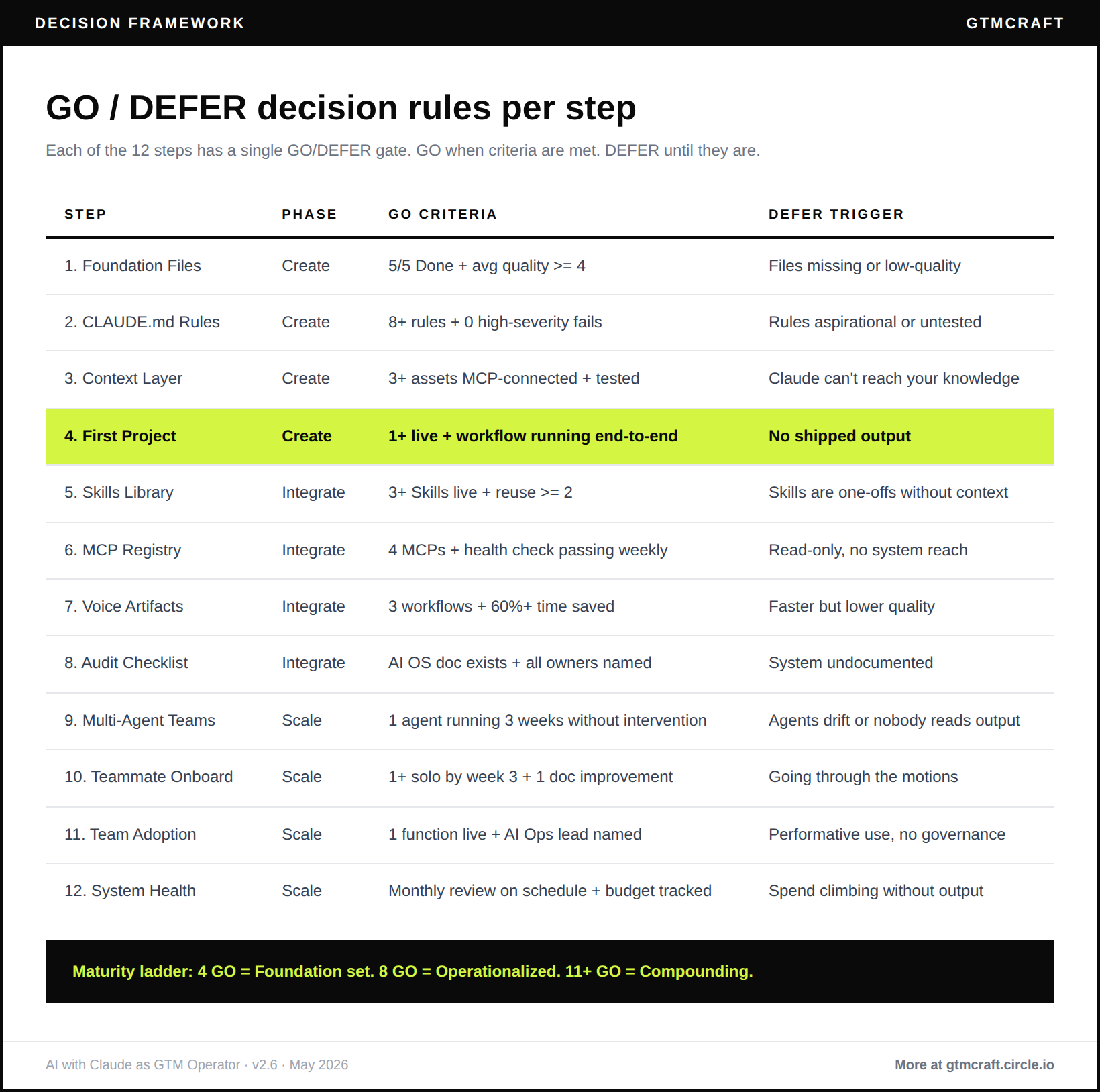
Phase 2 gate: three Skills in active use, four MCPs documented, one voice-prompted artifact workflow running, AI OS doc exists with owners and dates.
Phase 3: SCALE (week 3 and beyond)
Step 9. Deploy multi-agent architecture
Why this matters: one scheduled agent replaces 90 minutes per week. A 6-agent suite replaces eight-plus hours. This is where your AI stops being a tool you use and starts being infrastructure that works for you.
How to execute this week:
Pick 3 workflows from Phase 2 that are good agent candidates: recurring, structured input, structured output, clear destination.
Define the agent spec for each: name, schedule, MCP sources, artifact plus destination, escalation rules.
Choose infrastructure: Managed Agents (no server required), Mac Mini (full control, ~$600 one-time), or cloud instance (~$30 per month).
Run the agent manually for three weeks before scheduling. Three successful manual runs before you trust the automation.
Set the destination to somewhere a human sees the output within 2 hours: Slack, email, or Notion homepage.
Add the second agent only after the first has run successfully for 3 consecutive weeks.
What good looks like:
Your first scheduled agent posts useful output on schedule for 3 consecutive weeks without intervention
Your team reads the output and acts on it
The agent escalates edge cases with enough context that you resolve them in under ten minutes
Common trap: Deploying 6 agents in week one. One agent for 3 weeks. Add the second only after the first proves. Every operator who skipped this sequencing spent 2 weeks debugging a broken suite instead of learning from a working one.
Step 10. Deploy to a single teammate
Why this matters: a system that works only for you is a personal workflow, not shared infrastructure. The rollout to your first teammate is where you find out whether you built a system or a bespoke tool.
How to execute this week:
Pick one teammate: the person who runs the workflow you productized.
Share the AI OS documentation page before your first pairing session.
Pair for 90 minutes: they drive, you observe.
Let them run one real workflow solo that week. Stay hands-off.
Debrief. Update foundation files or CLAUDE.md based on what tripped them up.
3 weeks of solo operation. By week 3, they invoke Skills without watching you first.
What good looks like:
Your first teammate runs their primary workflow solo by week 3
They propose at least one improvement to the system in month 2
Your AI OS documentation gets meaningfully better from their friction feedback
Common trap: Rolling out to the whole team on day one. One teammate first. The friction is almost always in your documentation, not their skill. Treat their confusion as a documentation failure and fix the docs.
Step 11. Scale to the whole team with governance
Why this matters: team-wide adoption without governance produces ten different versions of your foundation files within 90 days. Governance is what makes the system an asset of the company, not just the person who built it.
How to execute this week:
Roll to one function at a time. Sales or Marketing first.
Host a 90-minute kickoff: each person runs one real workflow end-to-end in the session.
Designate one AI Ops lead per function: an operator who maintains the system in 30 minutes per week.
Install governance: monthly 30-minute cross-function review. Async-first. Cancel when there are no decisions to make.
Track adoption by Skill invocations per person per week, not by survey.
What good looks like:
Your whole GTM function runs on the same foundation files and Skills library by month 6
Monthly governance surfaces and resolves issues without drama
Adoption is measured by Skill invocations, not by sentiment
Common trap: Governance that becomes a monthly meeting nobody attends. Async-first, 30-minute cap. Delete governance rituals that have not surfaced a real decision in 60 days.
Step 12. Run quarterly audits
Why this matters: an AI OS that does not improve monthly gets worse monthly. Models move forward, foundation files go stale, Skills drift. Budget discipline keeps AI from becoming a $2,000 per month subscription mess where half the tools go unused.
How to execute this quarter:
Foundation files: are they current? Update anything stale from the last 90 days.
CLAUDE.md: are all rules still triggering? Delete the ones that have not fired.
MCPs: health-checked, scopes reviewed, auth refreshes logged.
Skills library: archive anything unused in the last 30 days.
Agent suite: review output quality drift. Fix before it compounds.
Budget: cancel any tool not used weekly.
What good looks like:
Monthly 30-minute system-health review happens on schedule every month
Your AI tool stack stays within budget without surprise over-spend
Foundation files updated at least once in the last 90 days
Common trap: Skipping the monthly review when things feel fine. The review catches drift before you feel it. Do it on schedule. The system only compounds at month 12 if you treated it as a living asset from month 1.
A note on my own setup
At Personio we use Gong AI and Qualified AI in production. We are currently evaluating whether Claude plus Clay, Salesforce and Gong MCP can replace a category AI-SDR tool before committing to one. That evaluation is ongoing. The result will go into the next version of this playbook. What I describe in the steps above is my personal GTM operator journey and coaching-client deployments, not a Personio-wide installation. The pattern is what generalises.
The prompt pack
4 prompts. One agent recipe.
Your Claude Chat prompt for productizing your first Skill
I want to productize this workflow into a Skill:

Workflow: [one sentence]
Frequency: [per week or month]
Current pain: [what is slow or error-prone]
Available inputs: [data sources, documents, MCP connections]
Required output: [the exact artifact]

Draft a complete Skill definition:
1. Skill name (outcome-based)
2. One-line description for the Skills index
3. System prompt with explicit input/output structure
4. Foundation files to attach
5. MCPs to use and what to retrieve from each
6. Three test inputs to validate on real data

Flag anywhere my inputs are too vague for the Skill to run reliably.
Your Claude Chat audit prompt for MCP health and Skills library
Audit my AI operating system for the past 30 days.

Skills: [list names]
MCPs: [list names]
Projects: [list names]

For each Skill: run against this known-good input [describe] and rate output 1–10.
For each MCP: check auth status, flag if refresh is due within 14 days.

Return a markdown table: Asset | Type | Status | Quality Score | Issue | Next Action
Then give me a prioritised fix list.
Your Cowork agent spec prompt for the weekly deal review
You are the Weekly Deal Review agent. Every Wednesday at 08:00 CET, run this workflow:

1. Pull all deals from HubSpot saved view "Active Pipeline Q2" where stage >= 3
2. For each deal, score on SPICED framework:
   Situation (what is true about their context),
   Pain (what is broken for them),
   Impact (the cost of inaction),
   Critical Event (the forcing function),
   Decision (who decides and how)
3. Pull the last 3 call recordings from Leexi for each deal and extract:
   - One quote that confirms or contradicts the Pain
   - The last agreed next action
4. Produce a ranked next-action list: deal name, SPICED score out of 5,
   last activity date, recommended next action with owner
5. Post the output as a thread to Slack channel #pipeline-review
6. If you cannot complete any step, post a "needs human" alert to #ai-alerts
   with the specific step that failed and why

Reference files: Deal Motion, Creator Style
MCPs: HubSpot, Leelix, Slack

Adapt this spec to my workflow: [describe your deal review workflow]
Output the adapted spec ready to paste into a Managed Agent or Cowork session.
Your Claude Chat prompt for quarterly system audit
I am running a quarterly audit of my AI operating system.

My Skills: [list names and last-tested dates]
My MCPs: [list names and last auth refresh dates]
My Projects: [list names and primary workflows]
My scheduled agents: [list names and schedules]

For each asset:
1. Propose one known-good test input to validate it still works
2. Propose one edge-case input likely to expose drift or failure
3. Describe what failure looks like and how to detect it before it compounds

After I run the tests and share results, help me build a prioritised fix list
for the next 30 days. Flag any asset that has not been tested in 90+ days as
a governance risk.
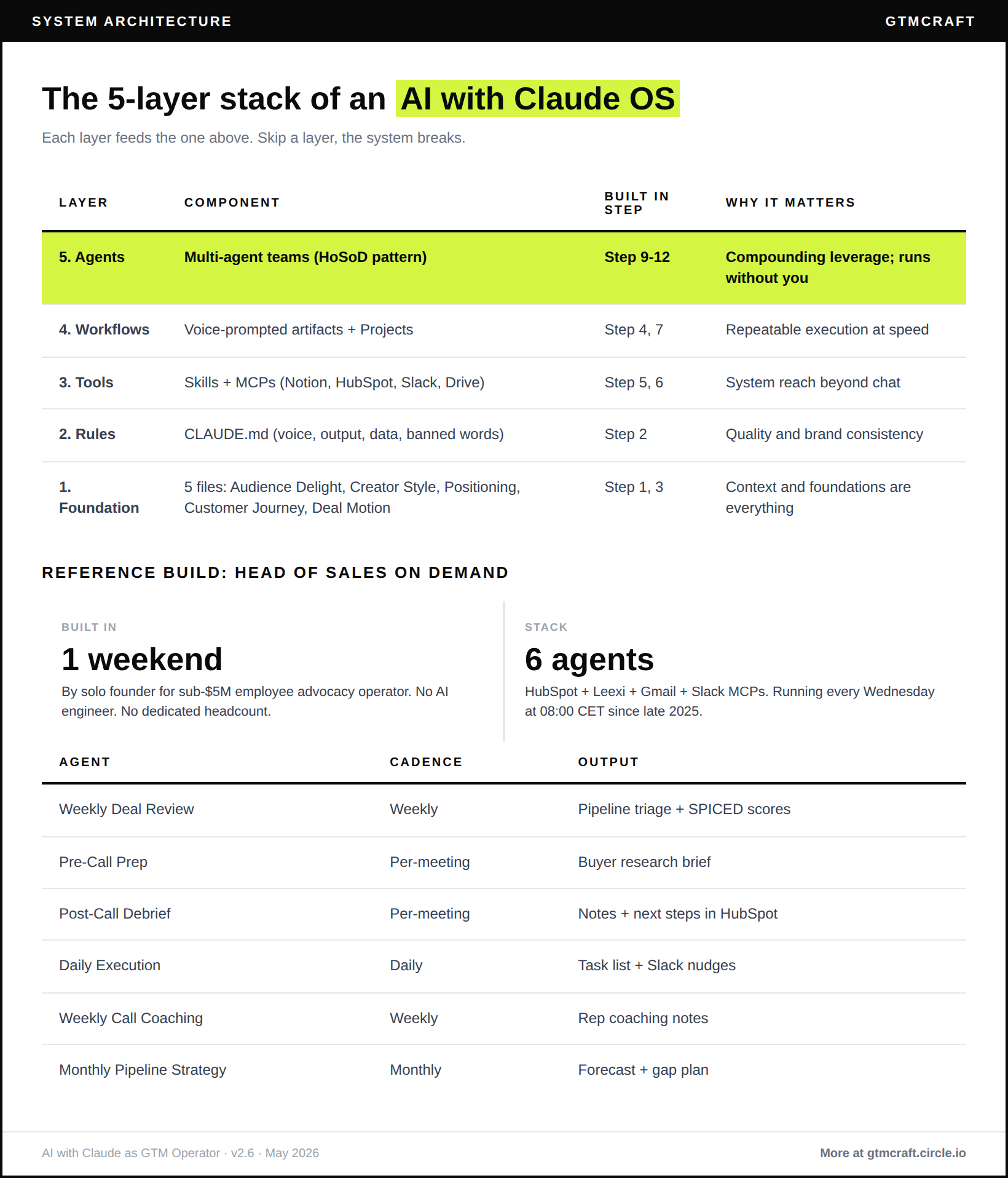
Head of Sales on Demand: three-agent skeleton
Deploys on Mac Mini or Managed Agents with HubSpot, Leexi, Gmail, and Slack MCPs connected.
Agent 1, Weekly Deal Review: runs Wednesday 08:00 CET. Pulls HubSpot active pipeline, SPICED-scores each deal using Deal Motion foundation file, posts ranked next-action list as a Slack thread to #pipeline-review.
Agent 2, Pre-Call Prep: triggers 90 minutes before each calendar meeting tagged as a sales call. Pulls HubSpot contact and deal data plus last Leexi recording summary. Posts a structured SPICED prep brief to the AE’s Slack DM.
Agent 3, Post-Call Debrief: triggers 30 minutes after a sales meeting ends. Pulls the Leexi transcript, updates HubSpot notes with SPICED delta, posts a coach-reviewed next action recommendation to Slack #deals.
Agents 4 to 6 (Daily Execution, Weekly Call Coaching, Monthly Pipeline Strategy) with full specs, infrastructure setup instructions, and the Mac Mini vs Managed Agents decision guide are in the companion doc below.
Self-assessment: where are you right now?
3 questions from the full 12. Yes or no:
Do all 5 foundation files exist and live in your primary Project?
Have you productized at least one Skill that runs without re-prompting from scratch?
Has at least one scheduled agent posted useful output three consecutive weeks in a row?
The full 12-question self-assessment with scoring bands, maturity levels, and specific next-step routing for each score is in the companion doc.
[Access the companion doc: full self-assessment, cadence pack, and agents 4 to 6]
Join the next cohort

Reply and tell me which Phase 2 step you are stuck on. MCP wiring, Skills productization, voice-to-artifact, or governance. I will send you the specific fix we have seen work across operators at your stage.
See you inside GTMcraft,
Koen
Your (human) GTM Agent
The Future GTM Operator is a reader-supported publication. To receive new posts and support my work, consider becoming a free or paid subscriber.